Search Console rank tracker
See your rank and the clicks it's actually earning, side by side
A rank tracker alone shows a number. GapDigest checks each keyword's Google position every day and reads your Search Console for the clicks, impressions, and average position behind it, so a page-one rank you don't feel in your traffic stops being a mystery.
Two numbers for every keyword
The daily check reads Google's top 10 from one location. Search Console shows the average position, clicks, and impressions real searchers produced over the last 28 days, at any depth. A keyword can hold position 7 in the daily check and still show weak clicks in Search Console, which is the flag worth a look.
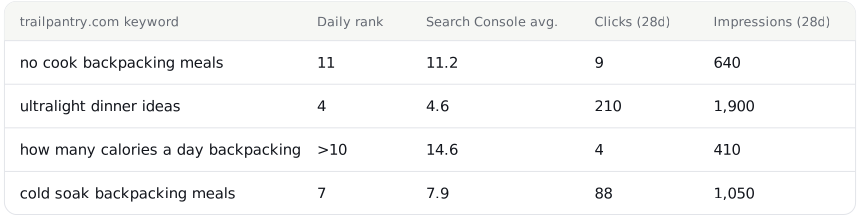
What connecting Search Console adds
Sixteen months, then every night
Connect once and GapDigest imports 16 months of Search Console history, then rereads the last 5 days each night, the window Google still revises.
A trend chart of clicks and impressions
Every tracked keyword gets its own 28-day total, plus a site-wide trend chart, so a rank that holds steady while clicks fall shows up as a line, not a hunch.
Positions past the top 10
The daily check reads Google's top 10 only. Search Console shows the average position of a query at any depth, so a keyword sitting at 14 doesn't just disappear.
What GapDigest finds in your Search Console data
Connected data sitting unread in a dashboard doesn't fix anything. GapDigest reads it for four problems worth a look, on the Insights tab.
Pages losing clicks
A page whose clicks fell against the four weeks before, so you catch the slide while there's still a page to fix.
Two pages on one query
When two of your own pages both earn impressions for the same query, so you can point one at it and let the other go.
Low click-through for the position
A page and query whose click-through rate sits well under what its position usually earns, often a title or description worth rewriting.
Untracked queries with impressions
A query Google already shows your site impressions for, but that isn't one of your tracked keywords, with a button to track it inside your plan's keyword limit.
Once a page gets a post plan or a refresh plan and goes live, the same connection shows whether its target keyword starts earning impressions and a position in Search Console, on the post plans page.
How the two checks fit together
Checked daily
Every tracked keyword gets a live Google search once a day, from the country, language, and device set on the site.
Read nightly
Search Console adds real clicks and impressions behind that position, refreshed for the last 5 days every night.
Reported weekly
Both come together once a week, alongside your striking distance queries and the keywords your competitors rank for that you don't.
Read the guide to checking a keyword's ranking for the difference between a live check and Search Console's own numbers, or see your striking distance keywords once Search Console is connected. Both arrive together in the weekly SEO report.
See a competitor's gap keywords now
Your domain against one competitor: up to 20 keywords they rank for and you don't, with searches, difficulty, and intent. No login.
Questions
Do I need Search Console to use GapDigest?
No. Daily rank checks work without it. Connecting Search Console adds clicks, impressions, and average position for each tracked keyword, and the striking distance list, on every plan including Free.
How far back does the history go?
GapDigest imports 16 months of Search Console history the first time you connect, then rereads the most recent 5 days every night, since that's the window Google still revises.
Does GapDigest replace Search Console?
No. It reads Search Console's own numbers and puts them beside your daily Google position and your competitors', so you check one weekly report instead of two dashboards.
My daily rank and my Search Console position for the same keyword don't match. Why?
That's the reason to track both. The daily check is one live Google search from the country and device you set. Search Console is Google's own record of the positions real searchers actually saw, averaged over the window. When they disagree, Search Console is the one that matches your traffic.
Which plans include it?
Every plan, including Free: daily checks for 10 keywords, one competitor, and a full Search Console connection.
What does GapDigest find in my Search Console data beyond the numbers?
Four things, on the Insights tab: pages losing clicks against the four weeks before, two of your own pages competing for the same query, a page whose click-through rate is low for its position, and queries Google already shows you impressions for that aren't a tracked keyword yet, each with a button to track it.
Connect Search Console with your first site
Ten keywords, one competitor, and a full Search Console connection, free, no card. The first weekly report brings both sets of numbers together.