AI Overview tracker
Don't write for a keyword Google now answers itself
A page-one rank under an AI Overview sends a fraction of the clicks it used to. GapDigest tells you which of your keywords, and which of the keywords you're about to write for, have one, so you pick the post that will still get read. On every plan, including free.
An AI Overview is the generated answer Google shows above the results for some searches. When it appears, fewer people click the results under it, so a page-one position on such a keyword sends less traffic than the same position on a keyword without one. An AI Overview checker tells you which keywords have one, so you can weigh a keyword before you write for it.
Where you'll see it
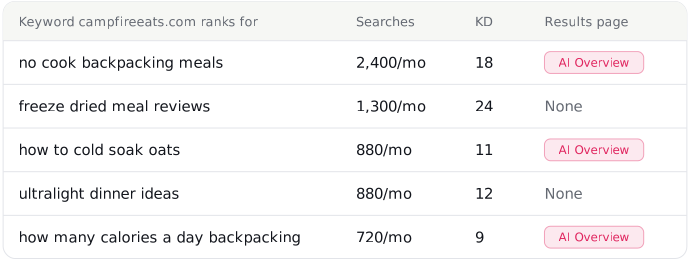
Beside each keyword you track: whether the results page has an AI Overview, whether you're cited in it, and which domains are cited when you're not. Beside each keyword a competitor ranks for that you don't, in the weekly report, with a line naming every gap keyword where a competitor is cited and you're not. And as one number per site: how many of your keywords face an AI Overview, so you notice when it climbs.
The flags come from the same read of the results page that gives each keyword its difficulty and intent, so they cost nothing extra and are on every plan. That read also shows whether the page has a featured snippet, a "People also ask" box, or video results, and it captures only the AI Overview present when the page first loads.
What to do with it
Weigh gap keywords
Two keywords with the same searches and difficulty are not the same post if one has an AI Overview. Write the other first, or write the flagged one as a direct answer with the question in a heading, which is the shape an AI Overview quotes.
Explain a traffic drop
When a keyword holds position 3 in the daily check but its Search Console clicks fall, the flag is the first thing to look at, and it sits right beside the rank and the clicks, so the answer takes one glance.
Watch the count
The overview counts how many of your tracked keywords face an AI Overview. When it climbs, the rewrite that answers the question outright moves up your list.
See a competitor's gap keywords now
Your domain against one competitor: up to 20 keywords they rank for and you don't, with searches, difficulty, and intent. No login. The AI Overview flag joins them once you track the site.
Questions
What does the AI Overview flag mean?
That Google showed an AI Overview at the top of the results page for that keyword the last time it was read, whether your site was cited in it, and which domains were cited instead. You see it beside every keyword a competitor ranks for that you don't, in the weekly report, and beside each keyword you track, with a count of how many of your keywords face one.
Does it say whether my site is cited in the AI Overview?
Yes. Each keyword shows whether its results page has an AI Overview, whether you're cited in it, and which domains are cited when you're not. The weekly report adds a line for each gap keyword where a competitor is cited and you're not. This comes from the same read of the results page that sets the keyword's difficulty and intent, at no extra cost. It captures the AI Overview present when the results page first loads; Google loads some AI Overviews later, and GapDigest does not fetch those. It does not check ChatGPT, Gemini, or Google's AI Mode.
How often is it updated?
The flag on a tracked keyword updates with that day's rank check. On a gap keyword, it's read with the weekly gap list. Difficulty, intent, and search volume refresh separately, at most every 30 days.
Which countries does it cover?
The 92 countries where the keyword index is available, listed when you pick a country for a site.